Soundboard
for Streamers
Sound effects, alerts, and meme drops — triggered live on stream with a single key.
Upload your clips, bind keyboard hotkeys, and fire sounds during your stream without leaving your game. Works in any browser — no virtual audio cables, no routing setup, no OBS plugins required.
How it works
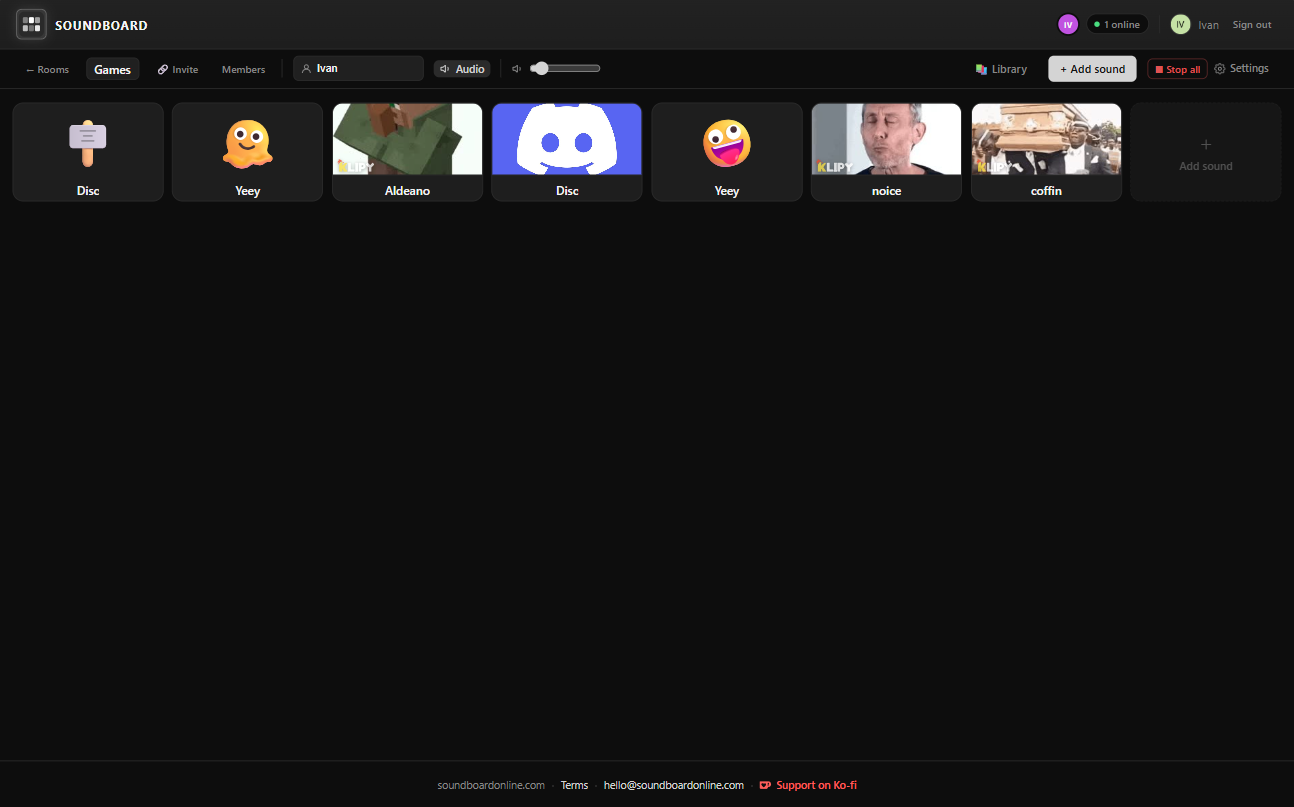
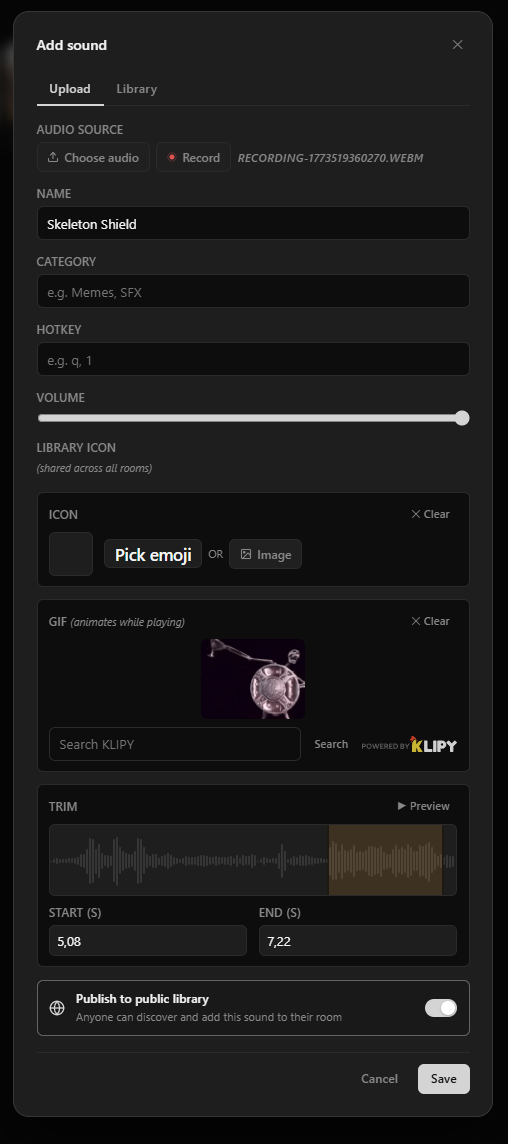
Upload your clips
Add sound effects, alert tones, meme drops, and music stingers. Trim each one to the perfect moment.
Bind hotkeys
Assign a keyboard shortcut to every clip you want at your fingertips during the stream.
Go live
Press a key during stream and the sound fires instantly in your browser. Your whole setup stays clean.
Made for live content
Hotkeys
Every clip can have its own keyboard shortcut. Trigger sounds in the heat of a game without switching windows.
Waveform Trimmer
Trim clips with the visual waveform editor. Start at the drop, cut the dead air, keep it punchy.
Upload Any Clip
MP3, WAV, OGG — up to 50MB. Upload your subscriber alerts, meme sounds, and hype effects all in one place.
Categories
Sort clips into categories — alerts, memes, reactions, music. Find the right sound fast, even mid-stream.
Share with Co-streamers
Share a room link with your co-host or squad. Everyone can trigger sounds and hear them in sync.
Free Forever
No subscription, no watermarks, no limits. Soundboard Online is free — for small streams and big ones alike.
Trigger sounds from your bot or Stream Deck
Channel points and chat commands
Every room has a free HTTP API. Point a Twitch channel point redemption or a !ps airhorn chat command at one POST request and the clip fires on stream — your viewers press the button instead of you.
Stream Deck and hotkeys
A Stream Deck Web Request action plays a sound on a physical key press. Or skip the API entirely and bind a keyboard hotkey in the board itself — whichever fits your setup.
An OBS browser source as the speaker
Drop a listen-only link into an OBS browser source and leave it running. It plays whatever the API triggers, so you never need a soundboard tab open in front of your game.
Read the API reference →A starter sound kit for your stream
The board that works on stream is smaller than you think. Ten clips you can hit without looking beat forty you have to scroll for. Start here, then cut anything you have not fired in a month.
Alerts and hype
The sounds your chat learns to recognise. Keep them short — under two seconds — so they punctuate what you are saying instead of talking over it.
- New follower chime
- Subscription horn
- Raid siren
- Donation or tip ka-ching
- Bit or cheer rain
- Milestone fanfare for goals
Reactions and memes
Your comedy timing depends on these firing on the beat, which means hotkeys, not clicks. Trim every one so it starts on the hit — dead air at the top of a meme clip ruins it.
- Airhorn
- Sad trombone
- Record scratch
- Bass drop / vine boom
- Rimshot for the bad jokes
- Crickets
Gameplay moments
Tied to what is happening on screen. These are worth recording yourself from the game so they match what viewers are already hearing.
- Clutch win fanfare
- Death or wipe sting
- Jumpscare accent for horror runs
- Countdown for a challenge or timer
- Rage-quit drum fill
Breaks and transitions
Longer clips that cover the gaps. Loop these under a "be right back" scene so the stream never goes silent — silence is what makes viewers check whether you crashed.
- Starting soon music bed
- BRB loop
- Outro track for the sign-off
- Ad-break transition sting
Music on stream is a copyright minefield — a VOD muted by a claim is the usual outcome. Stick to stream-safe libraries: Pixabay, the YouTube Audio Library, Freesound, or a licensed service like Epidemic Sound or StreamBeats.
See it in action
Level up your stream.
Free to use. No credit card required.
Frequently asked questions
- Do I need OBS plugins or a virtual audio cable?
- No. Soundboard Online runs in your browser and plays audio through your default output device. No virtual cable routing, no OBS plugins, no audio interface setup required. Open it in a tab and it works alongside any streaming software.
- How do the sounds get into my stream?
- If you already capture desktop audio in OBS or Streamlabs — most setups do, for game sound — the soundboard is picked up by that same capture with nothing further to configure. If you capture only your microphone, add a desktop audio source and your clips go out with everything else.
- Can I share my soundboard with a co-streamer?
- Yes. Share your room invite link with your co-host or squad. Everyone in the room can trigger sounds and hear them in sync — useful for co-op streams, podcast recordings, or group gaming sessions.
- What file formats and sizes are supported?
- MP3, WAV, and OGG files up to 50 MB per clip. Use the built-in waveform trimmer to cut clips to the exact moment — start at the drop, trim the dead air, keep it punchy.
- Can I trigger sounds with a keyboard shortcut during a live stream?
- Yes. Assign a hotkey to any clip in your soundboard. During your stream, press the key and the sound fires instantly in your browser without switching windows or breaking your gameplay focus.
- Is it free?
- Yes, completely free. No subscription, no watermarks, no limits. Soundboard Online is free for small streams and large ones alike.