D&D
Soundboard
Set the scene for every encounter — ambience, effects, and music, live and in sync.
Upload tavern music, dungeon ambience, and battle sound effects. Share a room with your players and every cue plays for the whole table at the same moment — whether your Dungeons & Dragons game runs around a kitchen table or over Roll20, Foundry, and Discord.
How it works
Upload your sounds
Add ambience, effects, and music. Organize them into categories by scene — combat, exploration, social, travel.
Share with your players
Paste the invite link in your Discord or virtual tabletop. Players join as listeners — one click, no account needed.
Run your session
Switch scenes with a button press. Your players hear the dungeon drip, the crowd roar, the sword clash — instantly.
Built for the table
Scene Categories
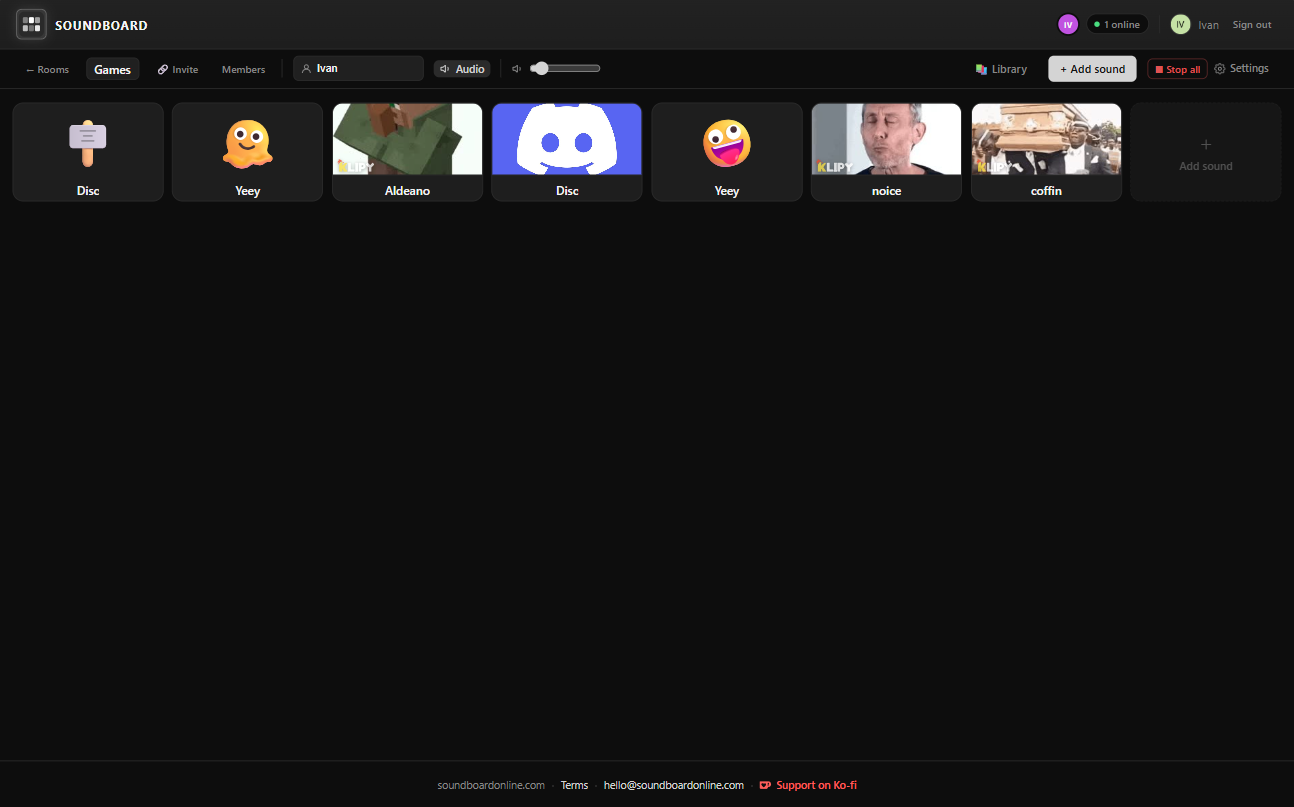
Organize clips by scene type. Switch instantly from a cozy tavern to a tension-filled dungeon crawl with a single press.
YouTube Background Music
Paste any YouTube link to stream ambient background music for everyone in the room — no upload needed.
Real-time Sync
Works for online sessions too. Every player hears sounds in sync, whether they're across the table or across the world.
Hotkeys
Bind keyboard shortcuts to your most-used clips. Trigger a sound effect mid-sentence without breaking the moment.
Waveform Trimmer
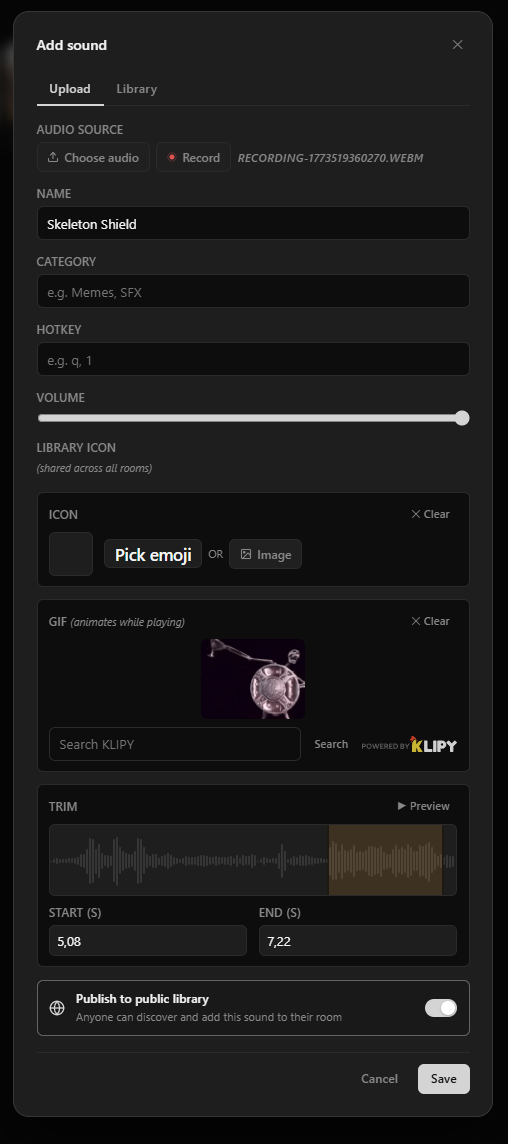
Trim ambience tracks and effects to start exactly where you want. No more awkward silences at the top of a clip.
Free Forever
No subscription required. Upload as many clips as you need and run as many sessions as you want — always free.
A starter sound kit for your table
A soundboard is only as good as what is on it. These are the clips that earn their place at most D&D tables — enough to cover a full session without hunting for a file mid-encounter. Build the first four groups before session one; add the rest as your campaign needs them.
Tavern and town
Where most sessions open and where the party keeps coming back. One long crowd loop plus two or three one-shots carries an entire evening of downtime roleplay.
- Crowd murmur loop (3–5 minutes, so it does not obviously repeat)
- Lute or fiddle background music
- Tankards clinking, a toast going up
- Hearth fire crackling
- Door swinging open on a cold night
- A brawl breaking out — chairs, shouting, glass
Dungeon and dread
Tension is mostly about what players cannot see. Loop something quiet and steady under the whole delve, then punctuate it — the one-shots land harder against a bed of near-silence.
- Water dripping in a stone corridor
- Distant chains, or something dragging
- Heavy stone door grinding open
- Rats or insects skittering out of reach
- Torch igniting with a whoosh
- A single low heartbeat, for the moment before the reveal
Combat
Keep these on hotkeys. Combat is the one part of the session where digging through a menu visibly kills the pace — you want the sword clash firing while the die is still settling.
- Sword clash and parry
- Arrow volley loosing
- Fireball or thunderclap for spell damage
- Dragon roar, or your campaign villain’s signature
- Critical hit fanfare
- A body hitting the floor
Travel and wilderness
Overland travel is where tables lose energy fastest. A change in ambience does a surprising amount of work to signal "you are somewhere new now" without another paragraph of narration.
- Wind across open country
- Hooves and cartwheels on a road
- Forest birds and undergrowth
- Rain, building to a storm
- Campfire for the night’s watch
- Wolves howling somewhere off the path
Table cues
Not in-world sounds — sounds about the game. These are the ones players start reacting to on reflex, and the ones they will ask you to play again.
- Initiative sting to open combat
- Level-up fanfare
- Natural 20 celebration
- Natural 1 sad trombone
- Session recap intro music
- End-of-session outro
Source clips you are allowed to use: Freesound, Pixabay, and the YouTube Audio Library all carry free-to-use effects and ambience, and Tabletop Audio publishes ambience made for exactly this. Ripped commercial soundtracks are not worth the risk — and the free libraries are genuinely good now.
See it in action
Your next session starts here.
Free to use. No credit card required.
Frequently asked questions
- Does it work with Roll20 and Foundry VTT?
- Yes. Soundboard Online works alongside any virtual tabletop. Open it in a separate browser tab during your Roll20 or Foundry session, share your room link in your Discord or VTT chat, and your players hear sounds in sync regardless of which VTT you use.
- Where do I find free D&D sound effects and ambience?
- Freesound, Pixabay, and the YouTube Audio Library all carry free-to-use effects — footsteps, doors, weather, crowds — and Tabletop Audio publishes long ambience beds made for tabletop sessions. Download the files, upload them to your board, and trim each one so it starts on the moment you want.
- Can I stream YouTube music as background ambience?
- Yes. Paste any YouTube link into the YouTube player panel and it streams ambient music for everyone in the room — no upload needed. Use it for looping tavern music, dungeon ambience, or battle tracks while you trigger one-shot effects from your soundboard.
- Does it work for in-person games as well as online ones?
- Both. Around a physical table, run it from your laptop through a speaker and treat it as one shared sound system. For a remote Dungeons & Dragons game, share the room link and every player hears the same cue at the same moment on their own machine.
- Do my players need an account?
- Yes, a free account is required to join a room. Players sign in with Google — it takes under a minute with no payment required.
- What audio formats are supported?
- MP3, WAV, and OGG files up to 50 MB per clip. You can trim each clip to start and end at the exact moment you want using the built-in waveform editor.
- Is it free?
- Yes, completely free. No subscription, no credit card, no limit on rooms, clips, or sessions. Soundboard Online is free for every GM and every table.